Maths and Coding Exam Prep!

Today in Ant’s we were told to prepare for the upcoming maths and coding exam by using aspects from the two demos in the ‘Fun With Physics’ task that we were given last week. I decided to go with the following game idea below.

ahd.gif

The game is very basic at the moment and I am looking to add further scripting and textures such as: A script where you only have a certain amount of moves before the player is destroyed and the level is restarted, a script where the player can only click on the blocks and not everywhere on the screen and multiple textures like an ice texture, ice block texture and some sort of character as the (partially) controllable player.

In the end I want it to look like this texture wise but not game mechanics wise because mine is going to be an ‘end to end’ game instead of this type of puzzle game.

That’s all for now on the Maths and Coding Exam,

Matty OUT!

Shield Update!

Across the week I have been determined to get either the shield finished or very close to it. I have added a lot of things to the shield like saw blades on the front for extra damage, more and different sized gears on the front to make the shield more busy in the frontal region and some gear themed handles on the back for the user to hold onto.

Below you can see the changes I have made.

BEFORE

AYE MATE.jpg

AFTER

SHIELD PROGRESS.png

I am very happy with how the shield is looking so far. The next step for the shield is to import it into mudbox to smooth the general shape of it out and to add fine detail like scratches and damage all around it to make it that little bit more detailed.


That’s all for now on the Triple S project,

Keep updated.

Matty OUT!

2D Game Animation!

Across both Gary and Chris’ lessons, I worked on improving the feel of my game. The major addition to my platformer came in the form of animations which turned out to be not as hard as I had imagined them to be in the end. The first step was rather simple and that was actually importing the sprite sheets to Unity; upon setting the sprite mode to multiple, I sliced it into 512×512 sections and it sliced perfectly because when I made the sprite sheets in photoshop they were this size. After that all that was needed to do was to shift click all of the frames and drag them into 3 separate animations.

The next part included me working with booleans when linking the animations together using parameters as done in the animator seen below.

dddadaddadadadadadaf.png

For example, the transition from idle to running stipulates that the running animation plays when the parameter “running” is set to true. I worked through these links one by one until they were all transitioned appropriately. After this, I had to tie this all in via the player controller script we made when we started the game creation. The animations look very off and quite jumpy and delayed but they can be fixed when we learn to.

On the more game design side of things I decided that when I finished my animation I should start to add my textures in that I created last week and I really like how it is starting to look like already with just a couple of assets. See what the current game is looking like at the moment below.

fr.png

Along with the current screenshot I have recorded a GIF of what the current animations and gameplay of the level looks like so far.

ahd.gif That’s all for now with the 2D platformer.

Matty OUT!

New 2D Asset(s)!

Today I started the creation of two more very detailed assets for my 2D platformer with Chris. One of the assets was some wooden stocks which turned out great in the end product and will be used in the game for aesthetic purposes just to make the game look better to the player.

Wood Stocks.png

26754261_2007088379576763_1588757452_n.jpg

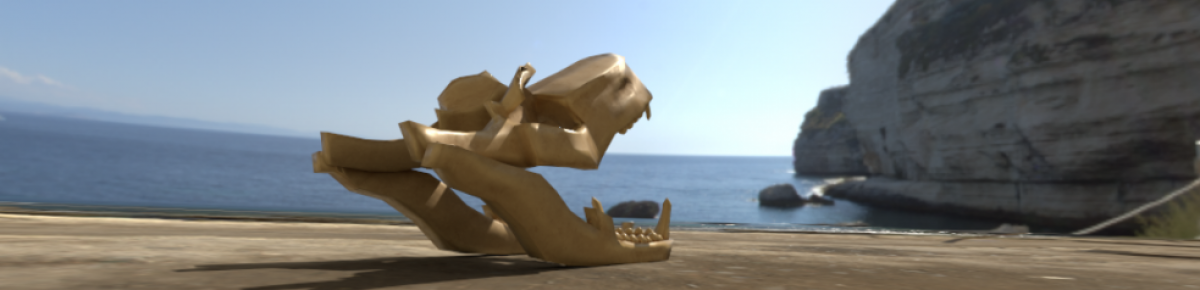
The other asset I made is also for aesthetic purposes because my aim for the game is to make it heavily detailed with nice looking assets and smooth controls to make a game that I am really proud of. The asset is a skull and bones which will be shown in the dungeon and under the dirt almost like a fossil of sorts to make the game that little bit more detailed.

Skull.png

That’s all for the assets for the 2D game for now but I am looking to add a lot more in the future so stay tuned.

Matty OUT!

Animation Progress!

Today in Matt’s we were told how to set up 3 point lighting in our animation scenes. I will start with the lighting aspect of the lesson by explaining what three point lighting is and the 3 lights that are in 3 point lighting.

Three-point lighting is a standard method used in visual media such as theatre, video, and film. By using three separate positions, the photographer can illuminate the shot’s subject however desired, while also controlling the shading and shadows produced by direct lighting.

  • The Key Light – This is the main light used on your subject
  • The Fill Light – The purpose of this light is to fill in the shadows created by the key light, preventing them from getting too dark.
  • The Back Light – This is used to separate the subject from the background.

3 Point Lighting.gif

In the other half of the lesson we were allowed to work on whatever we wanted that benefited our animations. So I decided to sort out the hierarchy and the character sets for my robot character. Below you can see the finalised hierarchy of my robot.

Hierarchy.png

After I finished the character sets of both my robot and chest I started the animation phase by blocking out the stages of part of the animation (I didn’t have enough time to do the whole animation). Below is the vimeo link to what I have so far.


2D Game Assets and Tile Set!

So today in Tony’s I started my tile set for the 2D game we are creating with Chris. During the creation of the post-apocalyptic tile set and assets I decided that I wanted to go for a different style/genre of game because I saw that the post-apocalyptic style of game not only didn’t suit my style of art but I didn’t see anything stand out that I could do for that type of game. After a lot of thought and advice from my peers I decided to go for a dungeon style of game that starts above ground (hence the dirt tiles) and goes down into a dungeon that the player can explore. This sudden change of mind does not effect the game in any sort of way because I can still use the background that I created but instead of being there for the whole game it will only be there for the start until the player goes into the dungeon.

As you can see below, I have made 4 assets in the tile set so far which are: a cellar door, a dirt block, a dirt block with grass and the tiles for the inner dungeon. This is just the very start of the tile set and I will be looking to add more to it in the future so stay tuned for more posts on the assets.

Until then,

Matty OUT!

Pixel Door.pngDirt.pngDirt With Grass.pngaye mate.png


Shield Modelling Progress!

Over the past two days I took it upon myself to improve the mesh on my shield and add a few decor related objects to make the shield look a lot better.

First of all I opened a new maya window and restarted all of the draw tool progress that I made previously and made the mesh ten times better without any triangles in amongst the squares.

Then I decided that I needed to make the shield look more steam punk stylised so I decided to model a few simple gears and bolts to scatter around the shield.

The more I work on my shield the more it looks like what I have wanted from the start when I first thought about the project.

AYE MATE.jpg

That’s all for now on the Triple S project,

Matty OUT!

Experimenting With Physics in Unity!

In Ants lesson we were informed that we would be using physics in Unity during that lesson and were divided into two sectors: one half focusing upon one demo scene and the other half focusing upon a different demo scene.

Luke and I were issued demo 2- leaving us to take this mechanic and create a game concept from it.

Below is what we came up with:

black-hole-demo-real.gif

The concept of demo 2 was that, when the attractor moves near, the surrounding sprites move toward the attractor. This is similar to the missile system we developed last year with Ant.

We decided to go for a game where you are a black hole and you are sucking up different types of debris which make the players movement speed and pull strength increase. This feature will truly make an impact when enemies are introduced which will make the player have to dodge things instead of just eating them.

This is all we have so far and will look to add more in the future.

Matty OUT!

Starting My Shield!

Today, with Ben, I started off my shield today. I blocked out my shield to begin with using the Quad Draw tool. Then I started to add detail but i haven’t got into the proper fine detail yet such as damage around the shield.  As you can see I have went for the more battle scarred style of shield. I also plan to re do the whole shield blocking when I learn more to give it that little bit more detail and so it can be textured a bit easier.

SHIELD PIC FOR BLOG.jpg

I still have plenty to do towards the shield but i have enjoyed the process so far, A power point will be uploaded near the end of the project to reflect on what I started with and where I ended.

That’s all for today,

Matty OUT!

2D Platformer Start!

Today, with Chris, I finally made a start on the platformer game in Unity. I started by creating a sprite for my player and importing  an image my zombie character made in voxel (we will start animating in Unity using the sprite sheets next week).

Next, I imported my background that I created also in the form of a PNG. I experimented with sorting layers to make it look as if the wrecked buildings are behind and out the way of the player so they can look and 26754261_2007088379576763_1588757452_n.jpg realise that the world is in ruins. In terms of game mechanics I have managed to get the player moving and jumping during the lesson and I will spend this weekend creating an apocalypse style tile set and assets.

So far I have created the first two beginning levels that get the player familiar with the controls. Below are these said levels:

ddda.gif

ddddddddddddddddd.gif

That is all for now on the 2D platformer,

Matty OUT!

Design a site like this with WordPress.com
Get started